


- Home
- Companies
- Acroname Inc.
- Products
- Acroname - Model R490 - BYOD Meeting ...
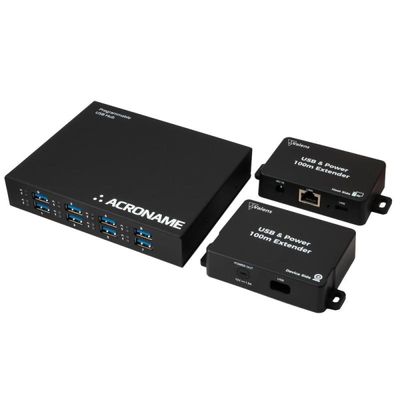
Acroname - Model R490 -BYOD Meeting Room Bundle with USB Host Switching and Extension
The Acroname BYOD Meeting Room Bundle is designed for seamless integration of personal laptops into conference rooms, enabling effortless USB peripheral sharing. It features the Acroname USBHub3+ host switcher paired with the Valens USB2 Extension, facilitating USB host switching and extension over distances up to 100 meters using CAT6 cables. The USBHub3+ is pre-configured for auto host-switching with port priority, instantly reallocating USB peripherals when a BYOD device connects or disconnects. In meetings, participants can easily share content without cumbersome hardware adjustments. This bundle is ideal for modern conference setups requiring remote connectivity solutions, providing robust, professional-grade performance. The system's rugged design ensures durability, while its plug-and-play nature simplifies installation. Power and data are efficiently managed across extended distances, ensuring that enterprise environments can deploy BYOD solutions without compromising on efficiency or reliability.
Presenters and participants in meeting rooms want to bring their own laptops to share content for meetings. You need an easy way to allow meeting participants to access and share the in-room USB camera and peripherals. When you're ready to add Bring Your Own Device (BYOD) capability and host switching to your conference room, look no further. Acroname has teamed up with Valens to offer a single kit with everything you need: USB host switching, USB extension (up to 100 m) and cabling. Just bring your own Cat6e cable to connect the extender and you're all set.
The USBHub3+ host switcher comes pre-configured for auto host-switching with port priority. So right out of the box, the host switcher will automatically move your camera and peripherals to the BYOD machine on Up0.
When the BYOD machine is disconnected, the USBHub3+ will return peripherals to the in-room host machine on Up1.
- Connect your BYOD host and power to the Host-Side Extender (Tx) module
- Connect the extenders together with a Cat6e cable of your choice
- Connect the Device-Side Extender (Rx) module to the Up0 connection of the USBHub3+
- Connect the in-room MTR or compute to the Up1 connection of the USBHub3+
- Acroname USBHub3+ kit (ordering p/n S79-USBHUB-3P)
- 1 - USBHub3+ Programmable 5Gbps USB Hub
- 1 - 3ft USB3 A-to-B cable (R408-USB3-A-TO-B-CBL)
- 1 - 6ft USB2 A-to-Mini-B cable (R318-USB-A-TO-MINI-B)
- 1 - AC/DC 120-240VAC in, 12V/5A out power supply (R469-ACDC-PS-3)
- 1 - Three position terminal block plug
- 1 - Quick start guide
- 1 - DIN rail installation guide
- Valens Professional Grade USB 2 Extension with Power (ordering p/n R489)
- 1 - Extender – Host Side
- 1 - Extender – Device Side
- 1 - 48V AC/DC Power Adapter
- 1 - USB Cable: USB-A to USB-C - 1.5 m (4.9 ft)
- 1 - USB Cable: USB-C to USB-C - 0.3 m (1 ft)
- 1 - Device Side 12V DC Power Cable - 0.3 m (1 ft)
- Screws for mounting
- Extender Documentation
- Additional items for BYOD Kit Connectivity
- 1 - 3ft USB3 A-to-B cable (R408-USB3-A-TO-B-CBL)
- 2 - 3ft USB3 C-to-B cable (C72-USB3-C-TO-B-CBL)