

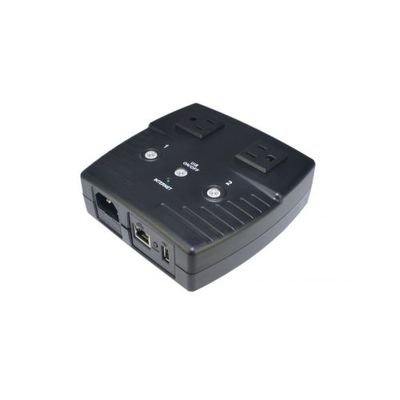
MSNSwitch - Model 522B -Internet Enabled IP Remote Power Switch
MSNSwitch Internet Enabled IP Remote Power Switch with Reboot - Control via Smartphone App, Cloud Service, Web Browser, Skype or Hangouts - 2 Independent AC Power Outlets (Model 522B).
MSNswitch is designed to automatically power-cycle any device when Internet connectivity is lost. This is useful if your router`s Internet connection drops. MSNswitch can automatically power-cycle the router for you, without anyone having to visit the remote location.
MSNswitch will automatically ping up to seven different preset targets, which can be changed, and if they are unreachable, MSNswitch will power-cycle one or both power outlets.
Pays for itself with just 1 saved site visit!
Applications:
- Automatically control and reboot remote any electrical equipment such as computers, modems, routers, DVRs, PLCs, industrial computers, etc...
- Maintain a continuous Internet connection by resetting power outlets when Internet freezes
- Monitor Internet connectivity and automatically cycles one or both outlets when connection is lost
- Manual power control over the Internet via a smartphone app, web interface, Skype or Google Hangouts + User definable scheduled power cycling
Features:
-
One press protect, no Internet setup required
- Functional out of the box!
- Monitor status, control outlets & configure device remotely via:
- Pings multiple Internet targets to determine status. Customize with user-definable fault tolerance
- Option to PING LAN IP or WAN IP
- 2 independently controlled 10A outlets - US 3 Prong Grounded Plugs/Outlets
- Perform sequential power ON/OFF
While the main feature requires only the push of a button on the switch, the device has advanced capabilities including:
- Power Scheduling - Up to 20 schedules may be set to turn power on/off to specific ports at specified times.
- Timed Power-Cycling - Automatically power cycle power ever X mins (1-1440).
- Event Logs - To keep track of when the unit had to reset power etc.
- E-Mail Alerts – Notify multiple users of various events
- Dynamic DNS Support & Remote Admin - Allows customers to login via the web to access controls, view logs, and remotely turn on/off power to specific ports or reset power.
- Heartbeat Monitoring - Reset one or both outlets if the MSNSwitch does not receive a heartbeat packet
- Google Hangouts & Skype Support - Sends you notifications and allows you to issue commands to check the status, as well as turn on/off power or power-cycle certain ports via Google Hangouts or Skype.
- Advanced Network Configuration - Allows you to setup to obtain a static IP address and use different DNS servers, and change HTTP web admin interface port.
- Save/Restore Configuration - Allows you to save your configuration, and easily restore the configuration to multiple units.
Specifications
- Dimensions 5" x 5" x 2"
- Socket Type 2x North American (Type B, NEMA 5-15R)
- Electrical Rating 10A, 125~250Vac (50/60Hz)
- Fuse Type 10A Thermal Fuse
- Available Outlets 2x fixed
- Internet Controllable socket 2x fixed
- Power ON / OFF switch Individual outlet power ON / OFF LED button (Press & hold 2 seconds)
- Power Indicator Orange LED
- Reset to Factory Defaults Front Button
- Internet Indicator Green LED
- Web Server CPU 32-Bit RISC CPU
- Supported Browsers IE and Java
- Supported Network Protocols HTTP, TCP/IP, UDP, SMTP, Dynamic DNS, DNS Client, SNTP, BOOTP, DHCP, FTP, SNMP.
- Network Access 10/100 Base-T , RJ45 (Cat.5)
- Operating Environment 0°C ~ 60°C at 10% ~ 90% relative humidity. For indoor use only.
LED Functions
- Internet controllable outlets ON Orange LED button ON
- Outlet 1 ON, Outlet 2 OFF Outlet 1 LED ON, Outlet 2 LED OFF
- Outlet 1 OFF, Outlet 2, ON Outlet 1 LED OFF, Outlet 2 LED ON
- System in Protect Mode (UIS On/Off button pressed) Blue LED ON
- No Internet Connection Blue LED OFF
- Internet is Online Blue LED Blinking